
The SEO-first Website Blueprint.
A website does not become search-ready because someone adds keywords after the design is finished. The work starts earlier: decide what each page must do, what evidence it needs and where a qualified visitor should go next.

The whole blueprint, before the detail.
Use these five decisions to test an existing site or plan a new one. If any step is unclear, the sitemap is not ready yet.
Define the commercial core
Name the services, solutions and actions that matter to the business.
Map real demand
Group buyer questions by intent instead of making a URL for every phrase.
Assign page roles
Give each route one job, one evidence requirement and one main next step.
Connect the system
Use navigation and internal links to move people towards a useful decision.
Verify and improve
Check the build, then watch qualified actions instead of page count alone.
Start with business decisions, not a page count.
A page deserves to exist when it helps a specific audience understand, compare or act. This keeps the site useful and makes ownership clearer after launch.
Teams often begin with a familiar list: Home, About, Services, Blog and Contact. That is a navigation draft, not an architecture. Before naming routes, write down the questions a buyer must answer and the proof the business can provide.
The result may be a smaller website than expected. That is fine. A focused route with evidence is more useful than several thin pages competing for the same query.
- Who is this page for?
- What question or decision does it support?
- What evidence can the business provide?
- What should a qualified visitor do next?
Build the pages the business must be able to stand behind.
These routes explain what the company does, who it is for and how a serious enquiry should continue. Supporting content should strengthen this core.
Homepage
Clarifies market, audience, capability and the most useful starting points.
Service pages
Explain scope, method, inclusions, limits and the next commercial step.
Solution pages
Address a business problem and connect the capabilities that may resolve it.
About
Shows ownership, principles, operating context and what the company will not claim.
Pricing or engagement
Helps buyers understand fit, boundaries and what affects cost.
Contact
Collects enough context for a useful reply without turning the form into an exam.
Give every route a clear responsibility.
The table is a working specification. It tells writers, designers and developers what a page must achieve before anyone starts producing it.
| Page type | Primary role | Evidence needed | Main next action |
|---|---|---|---|
| Homepage | Establish relevance and direction | Clear positioning, audience and capability | Explore the right service or solution |
| Service | Explain a defined capability | Method, scope, inclusions and limits | Discuss the service |
| Solution | Address a business condition | Diagnosis, options and connected capabilities | Request a focused review |
| Guide | Teach a repeatable process | Sources, method, examples and caveats | Apply the framework |
| Comparison | Support evaluation | Transparent criteria and trade-offs | Choose an approach |
| Location | Establish genuine local relevance | Local delivery, context and proof | Start a local enquiry |
| Contact | Qualify the conversation | Clear expectations and privacy handling | Submit a brief |
Establish relevance
Use clear positioning and capability to direct visitors to the right next page.
Explain a capability
Document method, scope, limits and the next commercial action.
Address a condition
Connect diagnosis, options and the capabilities that may help.
Teach a process
Use sources, examples and clear limitations.
Support evaluation
Present criteria and trade-offs without inventing a winner.
Prove local relevance
Create the page only when local delivery and evidence are different.
One query does not always need one page.
Group search terms by the job behind them. Then choose the page type that can answer that job with enough depth and a sensible next step.
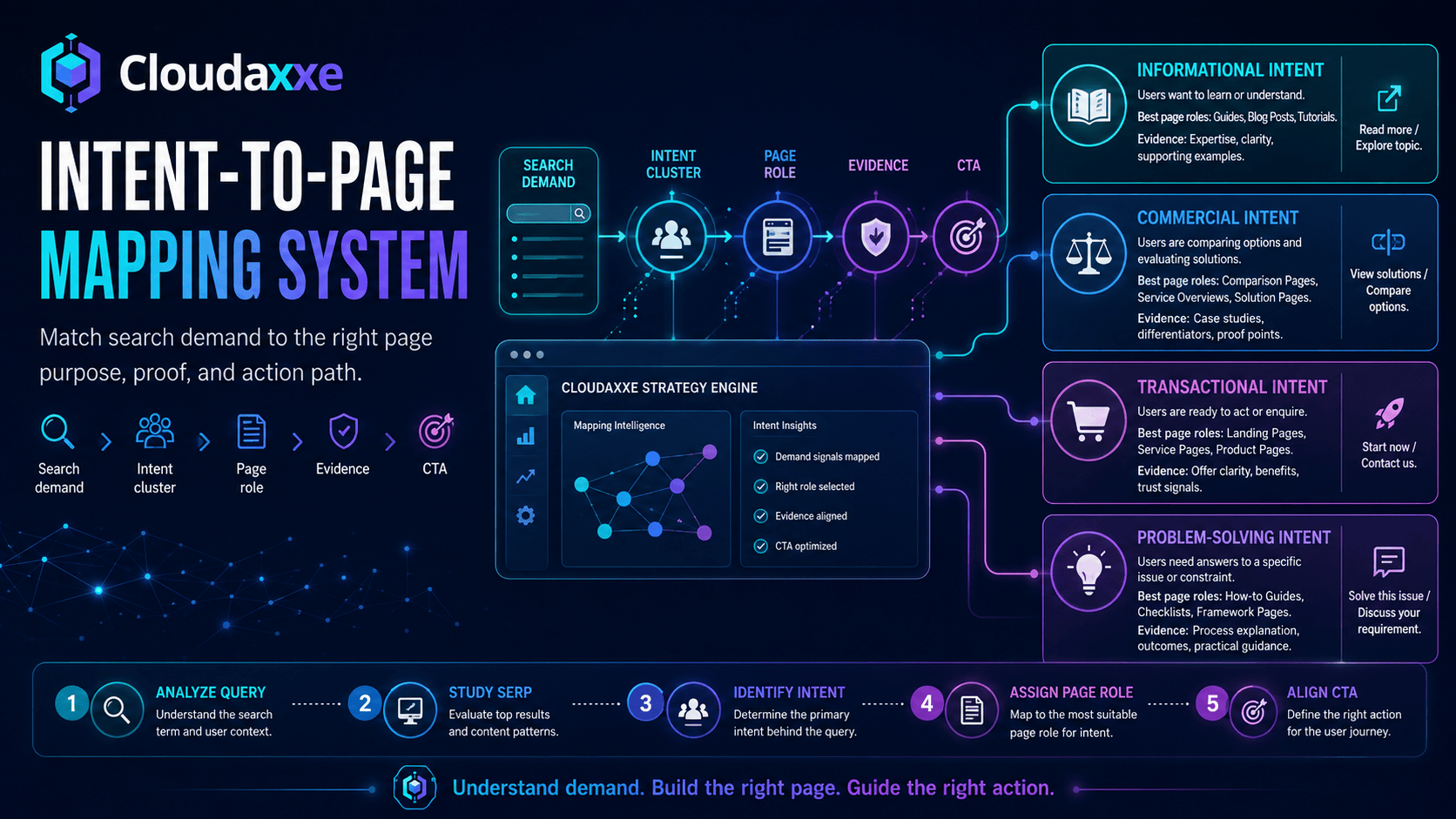
Learn, compare, verify, locate, buy or contact.
Service, solution, guide, comparison or location page.
Improve or consolidate before creating another route.
Volume alone does not decide priority.
Plan the proof before writing the claim.
Pages become difficult to maintain when nobody knows where a statement came from or who owns it. Treat evidence as part of the architecture.
Business facts
Service scope, process, locations, pricing rules and operational limits.
Observed data
Use a named method, period, source and clear limitations.
Published sources
Link to the original source and record when it was checked.
Ownership
Assign a reviewer and review date for claims that can change.
Links should help the next decision.
Navigation shows the stable structure of the business. Contextual links connect the reader’s current question to the next useful page.

- Use anchor text that describes the destination.
- Link guides to the service or decision they clarify.
- Link commercial pages back to supporting evidence.
- Keep breadcrumbs and navigation predictable.
- Orphan pages with no route in or out.
- Repeated links added only to manipulate counts.
- Every article pointing to the same generic CTA.
- Language switches that lose the current context.
Visibility and decision support belong in the same plan.
A page can rank and still fail. It can also convert existing traffic while remaining invisible to new demand. The architecture must account for both.
Easy to discover, hard to choose.
- Keywords are present
- The page can be indexed
- Traffic is reported
- Proof and next steps remain weak
Discovery leads to a useful decision.
- Intent matches the page role
- Claims are supported
- The next action fits the buying stage
- Qualified actions are measured
Translation is not automatically a separate SEO page.
Malaysian demand can differ across English, Bahasa Malaysia, Chinese and mixed-language searches. Research those patterns before deciding whether separate indexable pages are justified.
Client-side or on-page translation
This can help visitors read the page. It does not by itself create a separately indexable, fully localised SEO version.
Dedicated language URL
Create one only when the content, metadata, canonical, hreflang, links and ongoing review can be maintained in that language.
Decide what gets built first.
A long backlog does not explain where to begin. Score proposed pages using four practical signals, then choose the smallest connected set that can move the business forward.
Use real questions and demand patterns.
Connect the page to a commercial role.
Do not publish authority theatre.
Confirm ownership, data and dependencies.
Check the architecture before traffic finds the mistakes.
Technical QA matters, but it is not enough. Review page purpose, claims, forms and mobile behaviour alongside crawl and indexation checks.

A practical order for implementation.
The phases may overlap. Their purpose is to keep design and content production from running ahead of the decisions they depend on.
Foundation
Confirm audience, offers, route roles, URL rules and conversion actions.
Commercial core
Build the pages required to explain, qualify and receive real enquiries.
Evidence support
Add guides, comparisons and research that answer verified gaps.
Measure and improve
Review indexing, qualified visits, actions and operational feedback.
What usually makes the architecture harder to manage.
Most of these problems begin before launch. They are cheaper to prevent than to untangle later.
Several pages target the same job
Consolidate or give each route a genuinely different responsibility.
The blog has no link to the business
Connect useful resources to the capability or decision they support.
Location pages without local evidence
Do not manufacture local relevance from a template and a city name.
Literal multilingual duplication
Research demand and maintain complete localised versions.
Every page uses the same CTA
Match the next step to the reader’s stage and the page’s role.
No source or review owner
Document where important statements came from and when they expire.
Redesign without URL mapping
Plan redirects, content parity and internal-link changes before release.
Sessions treated as business results
Measure qualified actions and note where attribution remains limited.
Continue with the next decision.
Use these resources to move from architecture into demand research, prioritisation and measurement.
Questions that come up during planning.
What does SEO-first website architecture mean?
It means planning page roles, URLs, evidence, internal links and conversion paths with search demand in mind before design and content production are locked in. It does not mean writing for search engines instead of people.
Should keyword research happen before web design?
Yes, when search discovery matters. Demand research can affect navigation, page responsibilities, terminology and content requirements. It is easier to use that information before layouts and routes are final.
Does every service need a separate page?
No. A separate page is useful when the service has distinct intent, enough supportable information and a meaningful next action. Closely related services may be clearer together.
How many pages should a business website have?
There is no useful universal number. Build the smallest set that can explain the offer, answer important buyer questions, support claims and provide clear routes to action.
How should a multilingual Malaysian website be structured?
Research demand in each language first. Create dedicated indexable URLs only when the business can maintain complete localised content, metadata, canonical rules, hreflang and internal links. A translation widget is a reading aid, not a complete multilingual SEO setup.
How do internal links support SEO?
They help users and crawlers understand relationships between pages. Good links also move readers from education or comparison towards a relevant capability, proof source or next action.
When should similar pages be consolidated?
Consider consolidation when several pages answer the same underlying intent, repeat the same evidence and compete for the same next action. Preserve useful content and redirects during the change.
What should be checked before a website migration?
Map old and new URLs, redirects, canonicals, metadata, internal links, structured data, forms, analytics events, image assets and mobile behaviour. Crawl the site before and after release.
Plan the routes before producing more pages.
Share the current site, the pages being considered and the business decision the website needs to support. Cloudaxxe will identify a practical first step.